Ubuntu upgrade and PHP bug
22 October 2026 at 1:38 pm
I use the command line every day, but I prefer using a GUI. I don't do much server-stuff, but I have friends helping me out when I'm in too deep. Thanks to the nice UI tools at DigitalOcean, I got through yesterdays update of PHP reasonably well. Here are some notes from the process.
I started taking snapshots of the server using the UI provided by DigitalOcean. This has saved my ass multiple times before and it did so this time as well. In theory, all I needed was to update the PHP version to one of the fixed versions. Turns out that if you're on Ubuntu 20.04 LTS, that isn't all that easy. First of all - the fix isn't available for Ubuntu 20, so I had to bump up to 22.04 LTS. Then, DigitalOcean has made it easier and “safer” to do upgrades, but their mirrors absolutely didn't work and I got errors like this when starting the process:
E: The repository 'http://ubuntu.com focal Release' does not have a Release file.
N: Updating from such a repository can't be done securely, and is therefore disabled by default.
N: See apt-secure(8) manpage for repository creation and user configuration details.
E: The repository 'http://ubuntu.com focal-updates Release' does not have a Release file.
N: Updating from such a repository can't be done securely, and is therefore disabled by default.
N: See apt-secure(8) manpage for repository creation and user configuration details.
E: The repository 'http://ubuntu.com focal-backports Release' does not have a Release file.
N: Updating from such a repository can't be done securely, and is therefore disabled by default.
N: See apt-secure(8) manpage for repository creation and user configuration details.
E: The repository 'http://ubuntu.com focal-security Release' does not have a Release file.
N: Updating from such a repository can't be done securely, and is therefore disabled by default.
N: See apt-secure(8) manpage for repository creation and user configuration details.
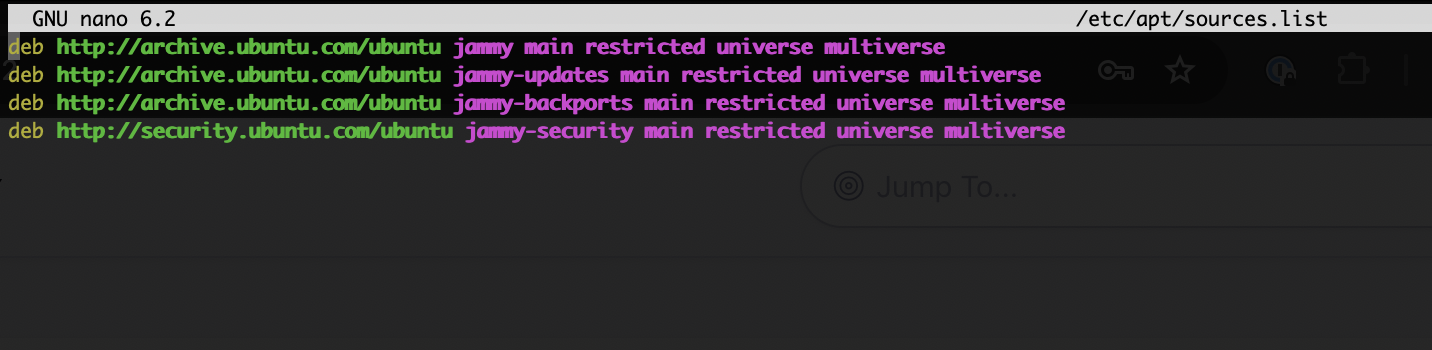
It took quite some time to resolve, but the answer was to delete the contents of /etc/apt/sources.list and replace all links to
mirrors.digitalocean.com
with links to the official Ubuntu URI
http://archive.ubuntu.com/ubuntu/
In the thread linked above, a DigitalOcean rep is claiming that it should work without doing this, but they obviously never tested this before replying. Multiple others on the forums point this out and likely, DigitalOcean don't really care since Ubuntu 20.04 is old and few use it. Another important hack is to temporarily open port 1022 for tcp traffic:
sudo ufw allow 1022/tcp
With this in place I could finally get v22.04 LTS installed. Formerly, such upgrades have been problematic, but as long as you edit your SSH config for the server and add this line, you won't loose the connection to the upgrade process:
ServerAliveInterval 10
Another trick is to start the process from a tmux terminal. If you don't do this, you won't be able to return to the upgrade if you are thrown out. Just type “tmux” to get a terminal inside the terminal. If you loose connection, you can then re-attach to the tmux terminal without the upgrade stopping. Very convenient!
With that in place, the OS upgrade and later the PHP upgrade went smooth and without errors. I also expect there to be lots of updates on PHP in the future since this was apparently a can of worms. With the current breed of AI tools, no issue that formerly have been passable as “difficult to abuse” can be overlooked.